Nested Groups
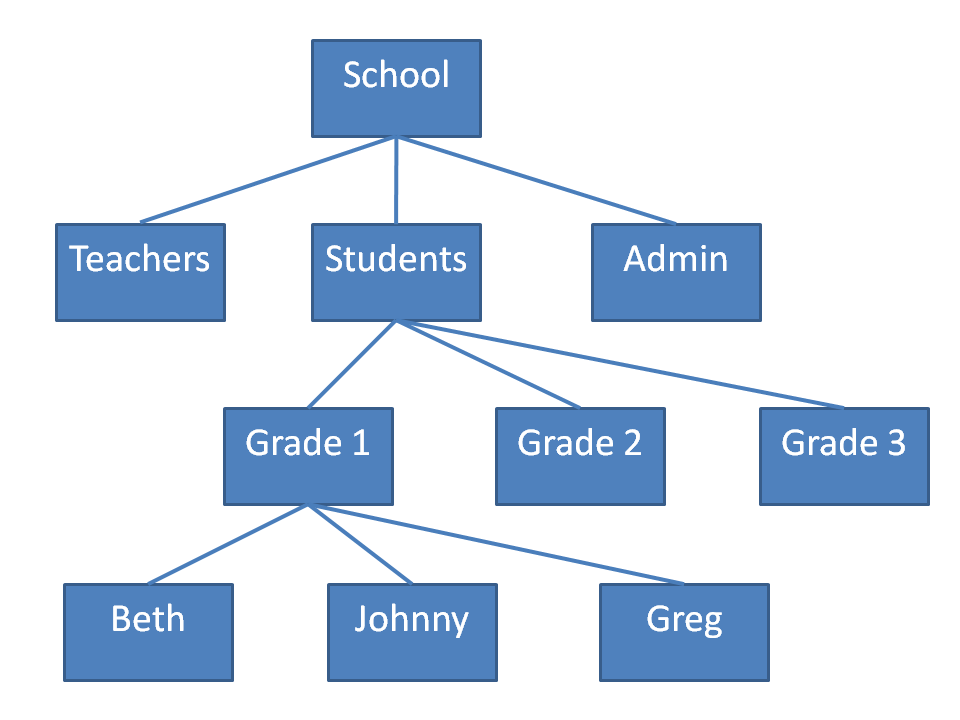
An example best explains the concept of "Nested Groups". Assume user "Johnny" is a member of group "Grade 1". In turn, group "Grade 1" is a member of group "Students". In addition, the group "Students" is a member of the group "School". User "Johnny" is a member of "School" by virtue of "Nested Group" membership. To recognize that "Johnny" is a member of "School", you need a function that reveals "Nested Group" memberships. "Nested Groups" are allowed in any version of Windows Server after Windows 2000, and even in Windows 2000 nested groups were allowed if the domain was in "Native Mode". Nesting is very useful in environments with many departments, especially if they are hierarchical.
An example of "Circular Nested Groups" would result if someone made the group
"School" a member of the group "Grade 1". Any function that deals with
"Nested Groups" must avoid an infinite loop if it encounters this situation.
Unfortunately, the WinNT provider cannot reveal "Nested Group" membership of Global
and Universal Security Groups. An IsMember function must use the LDAP provider to recognize
"Nested Groups". The WinNT provider will reveal nested local groups and nested domain
distribution groups.